
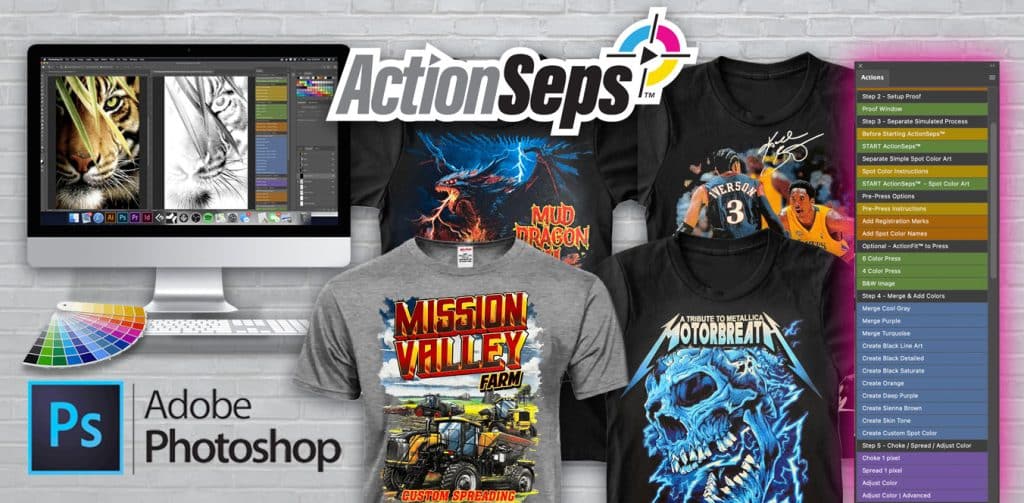
ActionSeps™ Simulated process software & training course. Simulated process is the use of multiple spot color halftone screens to achieve a realistic image on a garment. ActionSeps™ comes with our simulated process software and training course. Teaching you step-by-step how to separate and screen print simulated process.
You'll need the following items to use ActionSeps™:
- A computer
- Internet
- Adobe Photoshop
Course Content
Getting Started with ActionSeps™
How to be Successful with ActionSeps™ (Must Watch).
You don't currently have access to this content
Welcome & Joining the Community.
You don't currently have access to this content
How to Get Support.
You don't currently have access to this content
Discounted Adobe Suite Link.
You don't currently have access to this content
Module 1: Separating Full Color Art
How to Install ActionSeps™.
You don't currently have access to this content
Photoshop Actions Panel Changed? Here’s The Fix
You don't currently have access to this content
My Actions Look Different. Answer…Upgrades.
You don't currently have access to this content
Enhance Your Image.
You don't currently have access to this content
Reduce Your Seps to 6 or 4 Colors.
You don't currently have access to this content
Black & White Sim Process.
You don't currently have access to this content
Merge Seps and Reduce Screens.
You don't currently have access to this content
Seps for Color Shirts by Adding Black.
You don't currently have access to this content
Separating Realistic Art for Color Shirts.
You don't currently have access to this content
Separating Art for All Color Shirts, Example 2.
You don't currently have access to this content
Adjusting the White Base and Adding Black for Color Shirts.
You don't currently have access to this content
Custom Brown, Orange, and Purple Screen.
You don't currently have access to this content
Making Flesh Tone Separations.
You don't currently have access to this content
Creating Custom Spot Colors.
You don't currently have access to this content
Choking and Spreading Colors.
You don't currently have access to this content
Saving Images as a PSD or EPS.
You don't currently have access to this content
Print Your Separations with AccuRIP.
You don't currently have access to this content
ActionRIP™ 1.0 Training.
ActionRIP™ 1.0: Creating Halftones.
You don't currently have access to this content
Adding Registration Marks.
You don't currently have access to this content
Lest Chest Print Registration Marks.
You don't currently have access to this content
Creating Custom Registration Marks.
You don't currently have access to this content
Adding Spot Color Names to Film.
You don't currently have access to this content
Saving Your Seps as a PDF.
You don't currently have access to this content
Troubleshooting Tutorials.
Command Error Troubleshooting.
You don't currently have access to this content
Inverted Separations. Why and the Fix.
You don't currently have access to this content
Still Got Errors? Resetting Photoshop.
You don't currently have access to this content
Module 2: Understanding Separations
Understanding Separation Color Theory.
You don't currently have access to this content
How to Adjust the White Base for Bright Colors.
You don't currently have access to this content
Dialing in the Highlight White.
You don't currently have access to this content
What is Gain and How to Compensate for it?
You don't currently have access to this content
Module 3: Simulated Process Screen Print Training
What Inkjet Printer and RIP Software We Use
You don't currently have access to this content
Warming Up Your Pallets Before Printing.
You don't currently have access to this content
How to Use a Flattening Screen – Manual Press.
You don't currently have access to this content
Using a Flattening Screen.
You don't currently have access to this content
Screen Printing Simulated Process on an Automatic Press from Start to Finish.
You don't currently have access to this content
Live Print Examples
6 Color Simulated Process on a Manual Press.
You don't currently have access to this content
Good Separations vs Bad. Simulated Process Results on Press.
You don't currently have access to this content
Rap Icon T-Shirt 8 Color Sim Process Print.
You don't currently have access to this content
7 Color Simulated Process Goth Print on Black Shirts.
You don't currently have access to this content
7 Color Motorcycle Sim Process on Gray Tees.
You don't currently have access to this content
BONUS 1: Manual Separations and Recording Actions.
How to Manually Separate Sim Process Art and Print on Press.
You don't currently have access to this content
Creating Enhance Image Actions.
You don't currently have access to this content
Make and Record Proof Window Actions.
You don't currently have access to this content
Manually Separate and Record Actions.
You don't currently have access to this content
Make Reduce to 6 Colors Actions.
You don't currently have access to this content
Recording Reduce to 4 Color Actions.
You don't currently have access to this content
Create Color Merge Actions.
You don't currently have access to this content
BONUS 2: Registration Template.
Registration Template Tutorial.
You don't currently have access to this content
Student Q&A.
Adjusting the White Base and Overprint Colors to be Bright.
You don't currently have access to this content
Separating Spot Color Art with a Gradient.
You don't currently have access to this content
Anchor 4 Color Simulated Process Sep Help.
You don't currently have access to this content

i cant see the videos??? i have a fulltime job sometimes i dont have enought time to watch the videos right away , but i really interested in this course , can you please help me out
All fixed! I apologize about the inconvience.
All my videos say you currently dont have access to them.
Be sure to log into your account first. https://actionseps.com/my-account/
hi, whenever I save the file as PSD or EPS. when I go to open it in Adobe, I keep getting unsupported color mode or depth. Only RGB, CMYK, Grayscale, and Bitmap are supported. so am I doing somthing wrong in my steps?
Email me support@actionseps.com a screenshot and I’ll help you troubleshoot what’s going on.
Hello,
There’s no video attached to “What Is Gain And How To Compensate For It?” in Module 2. Everything else looks fine so far. It’s just that one that one that doesn’t come up.
Thanks for the heads up! I’ll look into the issue and get it taken care of.
Matthew, brother thank you so much. Man I had invested “A LOT” in myself and this one is the jackpot. This is where it’s at. To you and your staff mahalo! Y’all changing lives. Really awesom!
Thank you! It’s great to have you aboard.
Hi Mat, hope all is well with you. I really like the course and the curriculum you put together for those of us wanting to learn how to screen print and enhance our designs. That said i am unable to Mark as Complete the course on separation theory. Any assistance would be greatly appreciated.
I’ll sort this out! Those videos I had uploaded to Wistia instead of Vimeo. I’ll get this sorted ASAP.
Thanks, it’s all sorted out.
Been having so much success with using action seps on dark garments! but now need to do one for a white garment, is there a way to do it so the t shirt color is white?
There is! There’s a few lessons.
https://actionseps.com/lessons/adjusting-the-white-base-and-adding-black-for-color-shirts/
https://actionseps.com/lessons/seps-for-color-shirts-by-adding-black/
You’ll basically need to add a black if there is black in the graphic. Skip using a white base, but keep the white top / white highlight screen.
I hope this helps!
I have been trying to reach out to you but no response can you please respond
Hello,
I shot over an email. I’m out of the office on weekends. Office hours are M-F 9-5pm.
To answer your question, you’ll have to go to Image > Image Size and set your image size there. You’ll want to make sure your image is at print size at 300 dpi. You can scale an image up, but know that the quality of the print can suffer scaling images up. You always want to scale down if possible, granted your client or you have a large enough image.
I hope this helps.
-Matt
Hi Math,
I hope this publication find you well!
I want to know if it is possible to download the sames images you worked over te courses to test the knowledge you shared with us? Thanks a lot and have a nice day!!..
I’ll work on getting all those images up!
I am having trouble changing my password. Any help?
Go to My Account, and go to account details. You’ll have to scroll down past the course list.
Can I still get discount offer for ACTION DTX ?
Email me and I shoot you a code.
Ni puedo abrir un solo tutorial, no se ni por donde empezar 🙁
Asegúrese de que su navegador admita vídeo. Asegúrese de iniciar sesión en su cuenta antes de intentar ver las lecciones.
Hi Math,
“Does this Photoshop action include CMYK color separation techniques? I couldn’t seem to find them.”
I don’t recommend CMYK, which is why I’m reaching simulated process. CMYK is notoriously difficult and good for white or light shirts. You can print, flash, print, flash a white base, but the over print colors you’ll have to flash each one, which eats up a lot of time.
Not to mention, if you put more pressure on one of the CMYK colors, say blue. The print will come out more blue. So from shirt to shirt, they’ll all be inconsistent. The best method is simulated process. The inks are opaque, so you’ll get consistent prints from shirt 1-1,000,000. Not the case with CMYK.
Please let me ask, the video is very good but for each of your lessons I see there are image files to practice for one of your lessons but I don’t see the image files that you taught in the lessons, can you attach the source file of those images in the course or give me a link to download those images to help me practice more practically?
All images are now linked and any broken links fixed. Let me know if that changes and I’ll take care of the ASAP.
Very informative information! Thanks for allowing me to complete your program. I wasn’t very familiar with the screen printing process before the course, so I feel like I have learned a lot. Thanks for sharing your knowledge.
That’s awesome to hear! Looking forward to what you produce and seeing your progress.